- Docs
- Build tests
- Maintenance
- AI Steps
AI Steps
An AI step asks the AI to find its element on every run. Once it has passed and found the element, you can turn it into a regular action with a saved locator: the step runs faster, costs no AI call, and joins the Action List.
In short
On this page you can
- See every web AI step that passed in a pipeline run and found its element.
- Filter by Pending, Can't convert or Converted.
- Convert a step to a regular action in the same position of its test case.
- Rename the new action before saving it.
- Open the test case of a step, or jump here from a report row.
How to use it
- Run the test case in a pipeline until its AI step passes.
- Open Maintain › AI Steps; steps are grouped by test case.
- Click Convert to Action on the step.
- Check the action type and locator in Save as Action, edit the name if needed.
- Click Save as Action, then run the test case once to confirm.
What the tab lists#
One row per AI step, taken from its latest successful run. Running the same test case again updates the row; it does not add one. A step is listed when:
- it is an AI step that performs an action (an AI Do step) in a WEB project;
- it passed in a pipeline or scheduled run and the run recorded the action and locator the AI used. Dry Run results are not saved, so they do not count;
- it is still an AI step in its test case. Steps you deleted or changed by hand drop out.
Rows are grouped under their test case, with “n AI steps” next to its name. Click the test case name to open it in Automate.
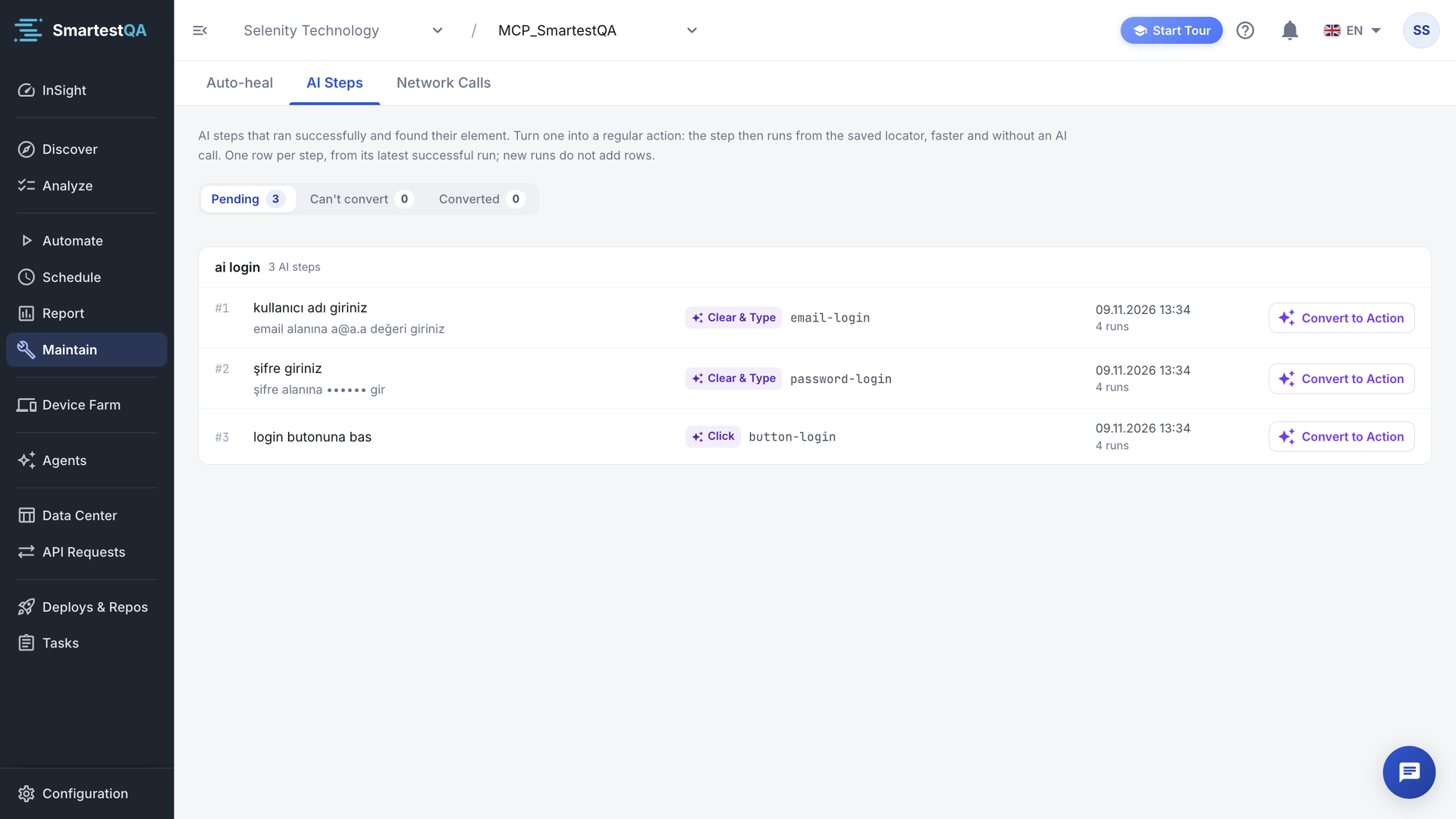
Filters#
| Filter | Shows |
|---|---|
| Pending | Steps you can convert. The tab opens here. |
| Can't convert | Steps whose AI verb has no action type. They say “"verb" has no action type; it stays an AI step.” See below. |
| Converted | Steps already turned into an action, with “Action #id”. |
Read a row#
- #n and name: the step’s position and name; below it, the instruction you gave the AI if it differs.
- Action chip: what the AI did, as the action type it will become, for example Click or Clear & Type.
- Locator: the locator the AI used. Hover to see its type.
- Date and “n runs”: the latest successful run and how many runs recorded this step. See the count.
Convert a step, step by step#
Find the step
Open Maintain › AI Steps on Pending. Coming from a report, the step is already highlighted.
Open the dialog
Click Convert to Action. The Save as Action dialog opens: “Convert this AI step into a permanent reusable action”. The screenshot of the run is in the corner; click it to enlarge.
Check what will be saved
Original AI Command is the name of the new action; click Edit to change it. Then check Action Type, Locator Strategy, Locator Value and, for typing steps, Parameter Value.
Read “What will happen”
- A permanent Action will be created and added to the Action List.
- This AI step will be removed from the test case and its AI Action will be deleted.
- The new Action will be added to the test case in the same position.
The page the action is filed under is shown next to the list.
Save
Click Save as Action.
“Action saved and step updated successfully”. The row moves to Converted with “Action #id”.
Run the test once
Run the test case in a pipeline or Dry Run to confirm the action finds its element without the AI.
What the conversion creates#
| Part | Rule |
|---|---|
| Action type | From the AI verb (see Browser actions): click → Click, type → Clear & Type (the AI replaces the field’s value), clear_and_type → Clear & Type, hover → Hover, select_option_by_text → Select, visibility_check → Visibility Check, navigate → Navigate, get / get_text → Get, double_click → Double Click, right_click → Right Click. Any other verb not listed under Can't convert becomes Click. |
| Locator | One locator with the type the AI used (id, name, xpath, css, link_text, partial_link_text, class_name, tag_name). An unknown type is stored as xpath. |
| Name | The name in the dialog, else the instruction. Longer than 60 characters, it is cut to 57 plus “...”. |
| Page | The title of the page the step ran on. |
| Value | For typing steps, the text the AI typed becomes the step’s input value. |
| Screenshot | The run’s screenshot becomes the action’s screenshot. |
| Test case | The AI step is replaced in the same position by a step that uses the action. |
An existing action is reused. If the project already has an action with the same type, page, name and locator, the step uses it and no copy is made: “An existing matching action was reused and the step was updated”.
After conversion, the step behaves like any recorded step: it uses the saved locator and, if the locator breaks, auto-heal can repair it. You can add more locators in Discover › Action List.
Steps that cannot be converted#
These AI verbs still run, but there is no action type to save them as: hoveroff, select_option_by_value, select_option_by_index, clear, press_enter, press_tab, press_escape, press_arrow_down, press_arrow_up, scroll_to, drag_drop, focus, upload, check, uncheck, screenshot. They are listed under Can't convert and stay AI steps. To make them deterministic, rewrite the step in Automate with a regular step or a Python or JS step.
When to convert#
Convert
- A step that passed in several runs with the same locator.
- Steps in pipelines that run often, where each AI call adds time.
- Steps on controls you will reuse in other tests.
Keep as AI
- A step whose target changes from run to run, such as “click the newest order”.
- A locator that is a long absolute XPath; add a stable locator first.
- A step you are still adjusting.
If something goes wrong#
Didn’t find your answer?Write to support with your project name and what you see on screen.
info@smartestqa.ai