- Docs
- Resources
- Deploys & Repos
Deploys & Repos
Deploys & Repos answers two questions per service and environment: which version is running, and did a pipeline test it after it was deployed? Your CI tells SmartestQA about each deploy; SmartestQA matches it with the pipeline runs that followed.
In short
On this page you can
- See the version (commit and tag) each service runs in DEV, TEST, PRP and your own environments.
- Spot deploys that no pipeline tested, shown as Not tested.
- Open a deploy to read its commits, changed files and the pipeline runs after it.
- Connect GitHub, GitLab, Bitbucket, Azure DevOps or Gitea repositories, with or without a token.
How to use it
- Open Repositories and click Add repository.
- Copy the deploy token and the CI step from CI code & deploy token.
- Add the step after your deploy step in CI and run one deploy.
- Run a pipeline in the same environment, then check Currently running versions.
At a glance
- Where
- Main menu › Deploys & Repos. Tabs: Overview and Repositories.
- Who
- Admins and Users with access to the project. Admins also see the repositories under Integrations.
- You need
- A Git repository URL and a CI system that can send an HTTP request after a deploy. A read-only token is optional.
- Time
- About 10 minutes: add the repository, store the deploy token in CI, add one step.
- Produces
- Deploy records per service and environment, with the previous version, commits and the pipeline runs that tested it.
- Used by
- The KPI cards on this page and Autonomous Agents that start when a deploy succeeds.
- Project types
- The same for WEB, MOBILE and DESKTOP projects. A deploy is matched with pipeline runs by environment, not by project type.
Start from your question#
I want to…
Something is wrong
Where Deploys & Repos fits#
The main menu is the order of work. Deploys & Repos sits beside it: it does not create tests. It watches what reaches each environment and checks whether the pipelines you built in Schedule ran against it afterwards.
- 1DiscoverPages, controls, rules
- 2AnalyzeRequirements
- 3AutomateTest cases
- 4SchedulePipelines per environment
- 5ReportResults of each run
- 6MaintenanceHeal and review
A deploy record comes from your CI. The “tested after” state comes from pipeline runs in Schedule. A click on a run opens it in Report. A failed run can become a task in Tasks.
Why use it#
- You see untested releases. A cell turns amber with Not tested when a version reached an environment and no pipeline ran there since.
- You know what changed. With a token, each deploy lists the commits and changed files since the previous successful deploy in the same environment.
- Several services, one view. A project can have many repositories (web, api, auth…). Each one is a row; each environment is a column.
- Agents can react to deploys. Every successful deploy is passed to Autonomous Agents, so an agent can run checks right after a release.
- It never blocks your release. The CI step ends with
|| true: if SmartestQA cannot be reached, the deploy still succeeds.
The building blocks#
- Repository
- A Git repository connected to the project, for example
https://github.com/acme/web-frontend. It has a provider, a service name, an optional access token and an environment mapping. - Service name
- The short key deploys are shown under, such as
weborapi. Unique in the project. - Environment
- Where a version runs: DEV, TEST, PRP, or a name you add such as STAGING. Pipeline runs carry DEV, TEST or PRP.
- Environment mapping
- Which environments you expect this repository in, with an optional branch and start URL for reference. It decides which cells show Not mapped.
- Deploy token
- A secret that starts with
sdt_. It lets your CI record deploys for one repository and nothing else. More. - Access token
- An optional read-only token for your Git provider. With it, SmartestQA reads commits and changed files between two versions. More.
- Deploy
- One record: repository, environment, commit SHA, status (Succeeded, Failed, In progress, Cancelled), version, branch, who deployed it and a link to the CI run.
- Tested after
- The pipeline runs in the same environment that started after a successful deploy and before the next one. Formula.
The screen#
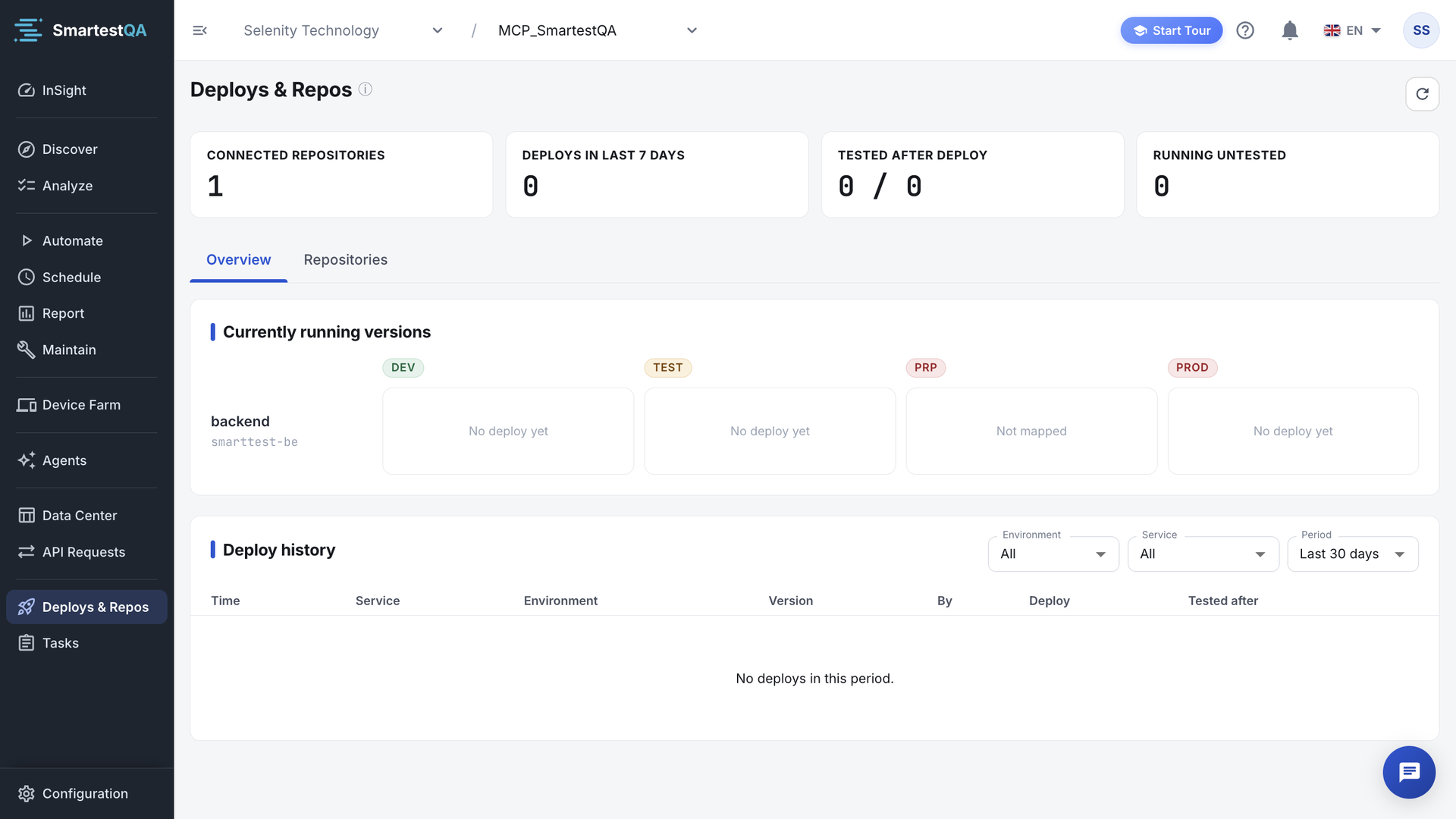
- Refresh (icon, top right): reloads the cards, the grid and the history.
- KPI cards: Connected repositories, Deploys in last 7 days, Tested after deploy, Running untested. How they are counted.
- Overview tab: Currently running versions (one row per service, one column per environment) and Deploy history.
- Repositories tab: Code repositories, where you add, change and delete repositories and get the CI code.
- Deploy detail: click a cell or a history row to open the side panel.
| Area | What it is for | Go there when |
|---|---|---|
| Currently running versions | The last successful deploy per service and environment, with its test state. | Before a release decision, or to see what a tester is testing. |
| Deploy history | Every deploy record, newest first, filterable by environment, service and period. | You look for a failed or cancelled deploy, or for who deployed what. |
| Deploy detail | Previous version, commits, changed files and the pipeline runs after the deploy. | A run went red and you want to know what changed. |
| Repositories | Connections, environment mapping, deploy token and CI code. | You set up a new service or rotate a token. |
No project selected? The page shows “Select a project from the header to manage its agents.” Pick a project in the header.
Before you start#
| You need | Why | Check it |
|---|---|---|
| The repository URL | To create the connection and build commit links. | It opens in your browser and contains owner and repository. |
| Access to your CI settings | To store the deploy token as a secret and add one step. | You can add a secret or credential to the pipeline. |
| Pipelines in Schedule that run per environment | Only pipeline runs count as “tested after”. | Your pipeline’s environment is DEV, TEST or PRP. |
| Optional: a read-only Git token | To see commits and changed files. | See the token types in Connection modes. |
Best practices#
Do
- Use one repository per deployable service, with short service names (
web,api). - Send the same environment names your pipelines use: DEV, TEST, PRP.
- Send the full commit SHA and, if you tag releases, the tag as
version. - Run a pipeline in that environment after every deploy, for example a smoke pipeline.
- Use a fine-grained, read-only token when you connect with a token.
Don’t
- Paste the deploy token into CI code. Store it as a secret.
- Give the access token write rights. Reading is enough.
- Report deploys to environment names no pipeline uses, unless you only want the version record.
- Reuse one repository record for two services: the deploys would mix in one row.
In this section#
Add, change and delete code repositories: provider, service name, token or notification only, test connection and environment mapping.
Deploys & ReposSend deploys from CIThe deploy token, the webhook URL and payload, ready-made CI steps, and what SmartestQA does with each notification.
Deploys & ReposVersions, history and deploy detailRead the Currently running versions grid, filter the Deploy history and open a deploy to see its commits and the runs that tested it.
Deploys & ReposHow the numbers workFormulas and worked examples for the KPI cards, the tested-after window, the cell states, the untested streak, commit counts and relative times.
Deploys & ReposTroubleshootingEvery Deploys & Repos message and symptom, with why it happens, what to check and how to fix it.
Deploys & ReposFAQ, MCP & limitsQuestions and answers, what AI assistants and agents can do with deploys, and the module’s limits.
Related#
Didn’t find your answer?Write to support with your project name and what you see on screen.
info@smartestqa.ai