- Docs
- Reference
- Step reference
- Checks and assertions
Checks and assertions
A test proves something only when it checks a result. The Assertion step compares a value from your run with the value you expect and stops the test case when they do not match.
In short
On this page you can
- Compare a saved value with an expected one using an Assertion Type such as Equals.
- Check numbers with Greater Than or Less Than, and text with Contains.
- Check that a value is empty or filled with Is Empty and Is Not Empty.
- Choose between Assertion, Visibility Check, AI Check and Network Check.
- Read the expected, actual and comparison lines of a failed check in the log.
How to use it
- Save the value to check in a variable first, for example with a Get or API step.
- Click Assert, pick a Page Name, an Assertion Type and a Test Step Name, then Add.
- Select the step and set actual to the variable, for example
{{tc:orderTotal}}. - Set expected to the value you want, or leave it out for Is Empty and Is Not Empty.
- Run a Dry Run; a mismatch stops the case and shows both values.
Choose the right check#
| Check | Use it to verify | On failure | Project types |
|---|---|---|---|
| Assertion (Assert) | A value saved by an earlier step: a text, a number, a status code, a database column | FAILED, case stops | All |
| Visibility Check | An element or a text is visible on the web page | FAILED, case continues | WEB |
| AI Check | Something you can see on the screen, described in words | FAILED, stops when stop-on-error is set | All, AI enabled |
| Network Check | A call the browser made: status, body field, header, duration | FAILED, case stops | WEB |
| Assert Visible, Assert Not Visible, Assert Text | An element on a mobile screen | FAILED, case stops | MOBILE |
| Assert Visible … Assert Checked | A control of a desktop app: visible, enabled, checked, text | FAILED, case stops | DESKTOP |
| Python or JavaScript with STATUS | Any rule you can write as code | ERROR, case stops | Python all, JS web |
Add an Assertion step#
Save the value first
An assertion compares values; it does not read the page. Put the value into a variable with a step before it: Get, an API JSON path, a Database output, a code step or an AI Ask.
Open the dialog
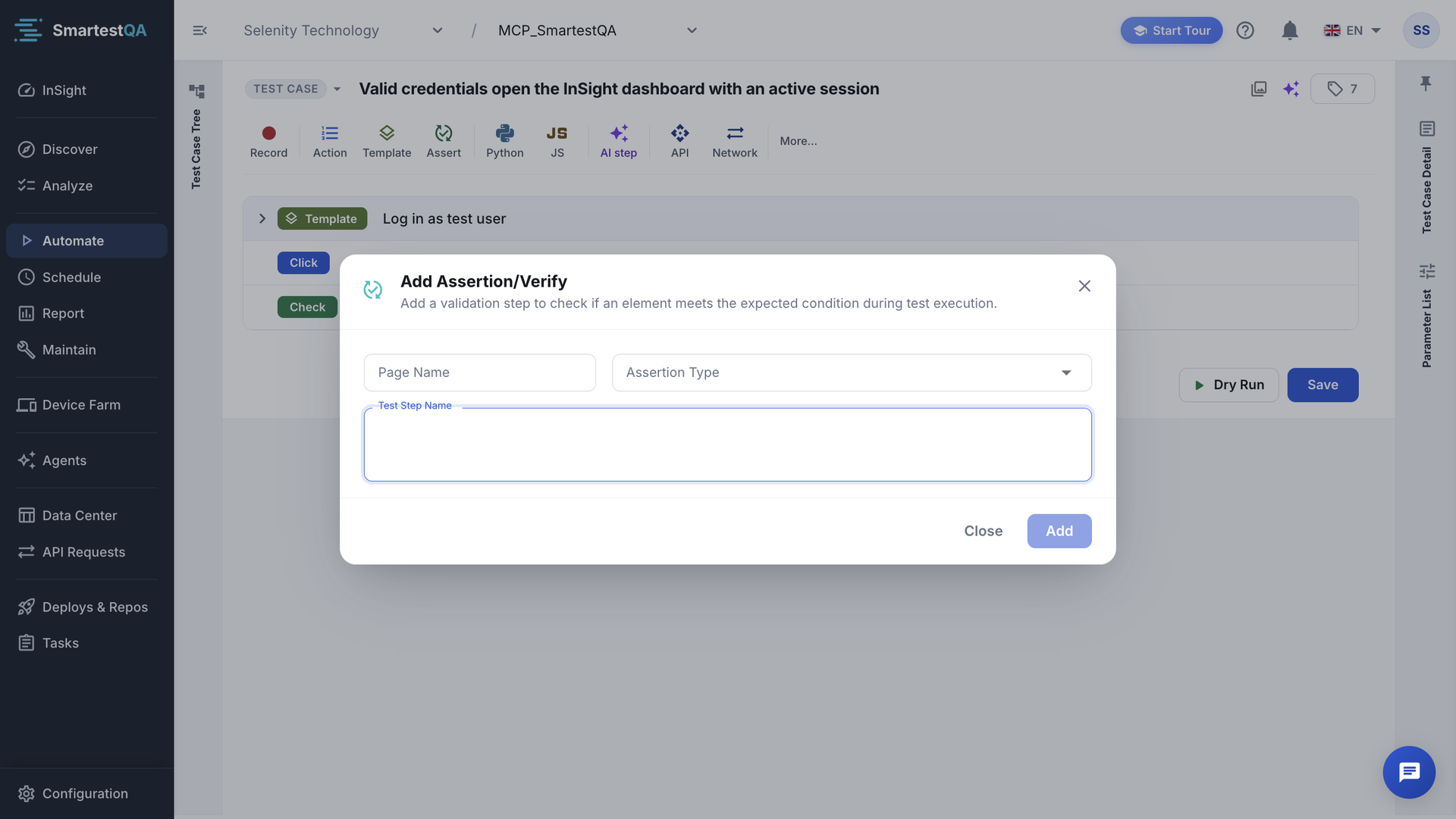
Click Assert in the step toolbar. The dialog Add Assertion/Verify opens.
Fill the three fields
Page Name: the page the check belongs to (pick one or type a new name). Assertion Type: the comparison, each with a short description. Test Step Name: what you check, for example
Total is above 1000. Add stays disabled until all three are filled.Set actual and expected
Select the new step. In the right panel set actual to the variable (
{{tc:orderTotal}}) and expected to the value you want (1000). You can change the assertion type there too; types that need no expected value remove the expected row.The step shows the chip Verify.
Save and run
Click Save and run a Dry Run.
Assertion types#
The list shows the assertion types set up for your installation. By default these ten:
| Type | Passes when | Needs expected | Example (actual → expected) |
|---|---|---|---|
| Equals | The values are exactly equal. | Yes | Paid → Paid |
| Not Equals | The values are not equal. | Yes | Draft → Paid |
| Contains | The value includes the expected text. | Yes | Order 1042 created → created |
| Not Contains | The value does not include it. | Yes | Saved → Error |
| Starts With | The value starts with the expected text. | Yes | INV-2026-17 → INV- |
| Ends With | The value ends with the expected text. | Yes | report.pdf → .pdf |
| Is Empty | The value is empty or blank. | No | |
| Is Not Empty | The value is not empty. | No | eyJhbGciOi… |
| Greater Than | The value is a number greater than expected. | Yes | 1234.5 → 1000 |
| Less Than | The value is a number less than expected. | Yes | 850 → 2000 |
How values are compared#
- Text is case-sensitive and not trimmed.
paiddoes not equalPaid, andPaid(with a space) does not equalPaid. Clean values with a transform on the Get step (Trim, Lower Case). - Equals and Not Equals compare numbers as numbers when both sides are plain numbers:
76equals76.0. Otherwise they compare the exact text. - Greater Than and Less Than need numbers on both sides. If not, the step stops with “Actual is not a number: '…'” or “Expected is not a number: '…'”. A value such as
€ 1.234,50needs the To Number transform first. - Missing variables count as empty. If
{{tc:orderTotal}}was never set, the live log says “{{tc:orderTotal}} not found, treated as empty” and the comparison uses an empty value. - The runner also understands Greater Than Or Equal, Less Than Or Equal, Matches Regex (matched from the start of the value), Is True (
true,1,yes) and Is False, if your list offers them.
if actual and expected are both plain numbers:  pass = number(actual) == number(expected)   (Comparison: number)
otherwise:                                     pass = actual == expected                   (Comparison: text)
Example: actual {{tc:qty}} resolves to 3.0, expected 3. Both are numbers, 3.0 = 3, so the step passes. With expected 3 pcs the comparison is text, 3.0 ≠ 3 pcs, and the step fails.
What the log shows#
Assertion FAILED (Total is above 1000)
----------------------------------------
Assertion Type: Greater Than
Expected: {{tc:limit}} → '1000'
Actual: {{tc:orderTotal}} → '850'
Comparison: number
A failed assertion ends the step as FAILED and stops the test case. Configuration problems also stop it, with a line under “Assertion configuration error”:
- “No assertion type is selected for this step — choose one (for example Equals)”
- “Unsupported assertion type: '…' — choose a type from the list (for example Equals)”
- “Expected is empty — enter the text to look for with '…'”
- “'expected' value was not found for type '…'” and “'actual' value was not found for type '…'”
Each one has a fix in Troubleshooting › Checks.
Common patterns#
| Goal | Steps |
|---|---|
| The success message appears | Get message → Assertion {{tc:message}} Contains saved |
| An API returned 201 | API step with JSON path @status into status → Assertion {{tc:status}} Equals 201 |
| The database row has the new status | Database step with output status → Assertion {{tc:status}} Equals SHIPPED |
| The UI shows what the API returned | API step into apiName, Get into uiName → Assertion {{tc:uiName}} Equals {{tc:apiName}} |
| A token was issued | API step with JSON path data.token into token → Assertion Is Not Empty |
Auto-heal can also repair an assertion whose expected value differs only in format (Equals, Contains, Starts With, Ends With). Such repairs wait for review in Maintenance.
Didn’t find your answer?Write to support with your project name and what you see on screen.
info@smartestqa.ai