- Docs
- AI
- Autonomous Agents
Autonomous Agents
Autonomous agents are AI workers that look after your project on a rhythm: after each deploy, every morning, every week or when you ask. They read your project, write a report and record any change they want as a proposal that a person applies.
In short
On this page you can
- Install ready-made agents from a catalog of fourteen, grouped by when they run.
- Build a Custom agent with your own instructions and tools.
- Run an agent on demand with Run now and read its report.
- Review the changes an agent proposes and apply or dismiss each one.
- Cap every agent with step, per-run cost and daily budget limits.
How to use it
- Open Agents in the main menu and pick your project in the header.
- Click Install new agent, choose an agent and click Install.
- Review the settings, save, then switch the agent on (it starts paused).
- Let it run on its trigger, or click Run now.
- Open the run from the card or the Runs tab and apply the proposals you agree with.
At a glance
- Where
- Main menu › Agents (page title Autonomous Agents). Tabs: Agents and Runs.
- Who
- Every role (Super Admin, Admin, User) in projects they can open. A User role’s agents can be refused tools its role has no permission for.
- You need
- A project selected in the header. Deploy agents also need a code repository; Deploy verification needs a Smoke pipeline.
- Runs on
- The SmartestQA server with the project’s AI connection, or a scheduled task in Claude Desktop.
- Produces
- A run with a summary, a report (also as PDF), every step it took, and proposals for changes.
- Safety
- New agents start paused. A server run never writes: every change waits for a person to apply it.
Start from your question#
I want to…
Something is wrong
Where agents fit#
Agents come after the order of work, not inside it. Once you have tests and pipelines, agents keep watching them so nobody has to check every morning by hand.
- 1DiscoverPages, controls, rules
- 2AnalyzeRequirements
- 3AutomateTest cases
- 4SchedulePipelines
- 5ReportResults
- 6Maintenance + AgentsWatch, triage, report
The last stage of the Setup Roadmap in Discover, Install autonomous agents, opens the agent catalog for you. Test Health shows “Autonomous agents this week” with a link, Go to agents.
Why use agents#
- No red run stays unexplained. Daily triage groups yesterday’s failures by cause before the team starts work.
- Everyone gets the same picture. Daily QA report and Weekly management report go to e-mail (with a PDF), Slack, Teams, Discord or a webhook.
- You see what is not tested. Coverage gap report lists untested points on the app map and sub-requirements without test cases.
- Deploys are checked right away. Deploy agents wake up when your CI reports a new deploy.
- You stay in control. An agent proposes; a person applies. Every run, step, token and cent is logged.
How a run works#
Something starts it
You click Run now, the schedule comes due, or a new deploy arrives. A paused agent never starts. If the agent already has a run going, a second one is not opened.
The budget is checked
If the agent has already spent its daily budget today, the run is recorded as Budget blocked and does not start. See how spend is counted.
The model works step by step
Each step, the model decides what to do next and calls one tool. It may call only the tools ticked in the agent’s settings; anything else is refused and logged as DENIED.
Changes become proposals
When a tool would change something (a locator, a defect, a tag), the server does not run it. It records a PROPOSAL step with the exact arguments.
The run ends
The agent writes its summary and report. The run ends Succeeded, Failed, or Stopped at limit when it hits the step or cost limit. The report goes to the targets in Reports.
You open the run, read the report and apply the proposals you agree with.
The building blocks#
- Agent
- One job with its instructions, allowed tools, trigger and limits. It belongs to one project. Every save creates a new version.
- Autonomous agent
- An agent installed from the catalog, with instructions written by SmartestQA. You can change its settings.
- Custom agent
- An agent you build yourself: you write the instructions and pick the tools. It starts paused and runs on demand.
- Trigger
- When the agent runs: Manual (only with Run now), Schedule (a cron expression) or After each deploy.
- Run
- One execution of an agent, with its status, steps, tokens, cost, summary, report and proposals.
- Step
- One entry in a run: MODEL (a decision), TOOL (a tool call), PROPOSAL (a change waiting for a person), FINAL or ERROR.
- Proposal
- A change the agent wants, saved with its exact arguments. Apply runs it as you; Dismiss drops it.
- Runs on
- Who executes the run: the SmartestQA server (uses the project’s AI connection and costs tokens) or your Claude Desktop (a scheduled task there calls the agent).
The screen#
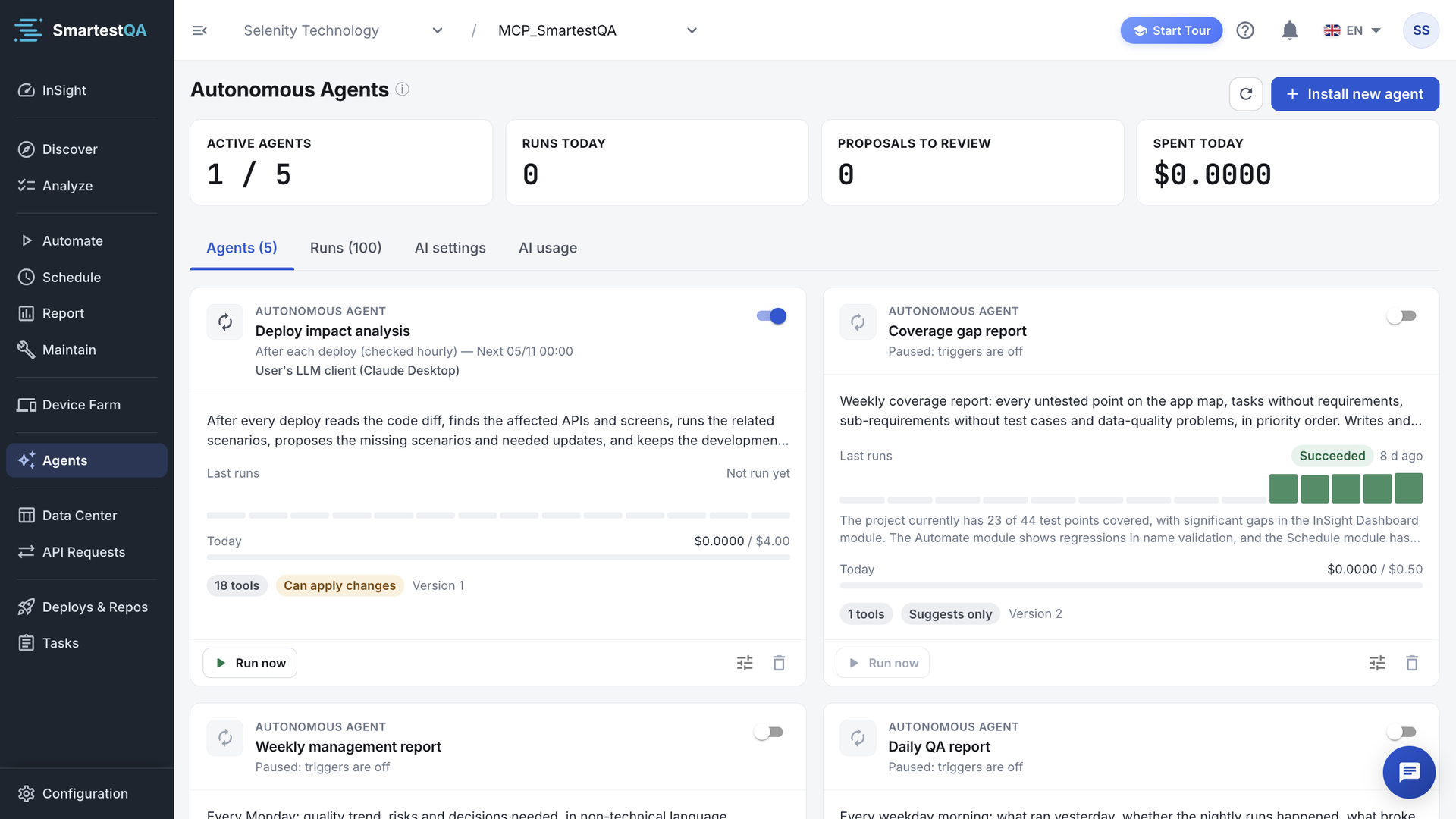
- Refresh and Install new agent in the header.
- KPI cards (when at least one agent exists): Active agents, Runs today, Proposals to review, Spent today. How they are counted.
- Agents (n): one card per agent with its switch, last runs, today’s budget and Run now.
- Runs (n): the latest 100 runs of the project. Click a row to open it.
The tab is kept in the address (?tab=runs), so a refresh or a shared link opens the same tab. While any run is queued or running, the page refreshes itself every 5 seconds.
Before you start#
| You want | You need | Check it |
|---|---|---|
| Report agents (triage, QA report, coverage gap) | Test runs and pipelines in the project; the project’s AI connection working | Report shows recent runs |
| Deploy verification | A code repository in Deploys & Repos and a pipeline tagged smoke | The catalog card shows no warning |
| Deploy impact analysis | A code repository with an access token that SmartestQA can read | The catalog card shows no warning |
| Reports by Slack, Teams, Discord or WhatsApp | The channel set up and enabled in Integrations | The channel is tickable in Reports |
| Runs in Claude Desktop | Claude Desktop with the SmartestQA MCP installed, open at the scheduled time | The card shows no “Expected run did not arrive” line |
Best practices#
Do
- Start with the Core agents: Daily triage, Daily QA report, Coverage gap report.
- Run a new agent once with Run now before you switch on its schedule.
- Keep the safe rules on in custom agents: no deleting, proposals only, never PRP.
- Read the proposal’s Input before you click Apply.
- Send reports to a team channel so the result is seen, not only stored.
Don’t
- Click Apply all without reading what each proposal changes.
- Raise the daily budget to make a failing agent “try harder”: fix its instructions instead.
- Tick every tool in a custom agent. Give it only what its job needs.
- Install two agents that do the same job on the same schedule.
Agents, MCP or doing it yourself#
| Way | Best when | Who decides |
|---|---|---|
| Autonomous agent | The same check must happen every day or after every deploy | The agent proposes, you apply later |
| AI assistant through MCP | You want to build or fix tests in a conversation, now | You approve each diff in the chat |
| Report and Maintenance screens | You want to look at one run or one heal yourself | You |
In this section#
The fourteen ready-made agents, what each one needs, how to install one and how to start a custom agent.
Autonomous AgentsAgent settingsEvery tab of the agent settings dialog: instructions, tools, trigger and where it runs, report targets and limits.
Autonomous AgentsRuns and proposalsStart a run, follow it, read its report and steps, and apply or dismiss what the agent proposed.
Autonomous AgentsHow the numbers workFormulas and worked examples for the four KPI cards, run cost, the limits, the budget meter, the run bars and the overdue warning.
Autonomous AgentsTroubleshootingEvery Autonomous Agents message and symptom, with why it happens, what to check and how to fix it.
Autonomous AgentsFAQ & limitsQuestions and answers about autonomous agents, how agents relate to MCP, and the limits.
Didn’t find your answer?Write to support with your project name and what you see on screen.
info@smartestqa.ai